
If you’re deploying anything real on AWS, a handful of decisions made early tend to matter far more than they seem to at the time. This isn’t an exhaustive AWS reference — it’s the practices that most consistently separate teams that get burned from teams that don’t.
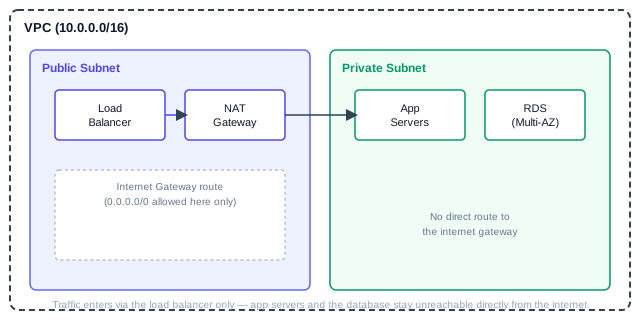
A typical safe baseline: only the load balancer sits in the public subnet — app servers and the database stay in a private subnet with no direct route to the internet.
Most of the practices below map directly onto this picture — keep it in mind as you read.
Identity and Access Management (IAM)
Never use the root account for daily work. Create an IAM user (or better, use IAM Identity Center / SSO) for every human and service that needs access, and lock the root account away with MFA enabled, used only for account-level tasks like billing changes.
Tip: apply the principle of least privilege from day one — it's far easier to grant a permission when someone actually needs it than to audit and remove overly broad permissions later.
Prefer IAM roles over long-lived access keys wherever possible. An EC2 instance or Lambda function should assume a role with exactly the permissions it needs, rather than having AWS credentials baked into code or environment variables.
{
  "Version": "2012-10-17",
  "Statement": [
    {
      "Effect": "Allow",
      "Action": ["s3:GetObject"],
      "Resource": "arn:aws:s3:::my-app-assets/*"
    }
  ]
}
This policy grants read-only access to objects in one specific bucket — nothing more. Scope every policy this tightly, resource by resource, rather than reaching for "Resource": "*" out of convenience.
Cost control
Set up AWS Budgets with alerts before you need them, not after a surprise bill. A simple budget alert at 80% of your expected monthly spend catches runaway resources (like a forgotten large EC2 instance, or misconfigured autoscaling) early.
Tag every resource with a project/owner tag consistently — this is what makes AWS Cost Explorer actually useful later. Untagged resources become nearly impossible to attribute once a bill gets large.
Networking basics that prevent real incidents
- Keep databases and internal services in private subnets, with no direct route to the internet gateway. Only your load balancers or NAT gateway should sit in public subnets.
- Use security groups as your primary firewall, and keep them as narrow as the IAM policies above — a security group allowing
0.0.0.0/0on port 22 (SSH) is one of the most common real-world misconfigurations found in security audits.
Reliability: assume things will fail
Design for multi-AZ (Availability Zone) deployment by default for anything production-facing — a single-AZ deployment means one data center issue takes your service down entirely. RDS, for example, supports Multi-AZ deployments with automatic failover built in; it’s a checkbox, not a redesign.
Enable versioning on S3 buckets holding anything important. It’s a one-line setting that turns “someone accidentally deleted a file” from a disaster into a two-minute recovery.
What’s next
None of this requires deep AWS expertise to implement — it’s mostly about establishing these habits before you need them, not after an incident forces the issue.